Setup Election
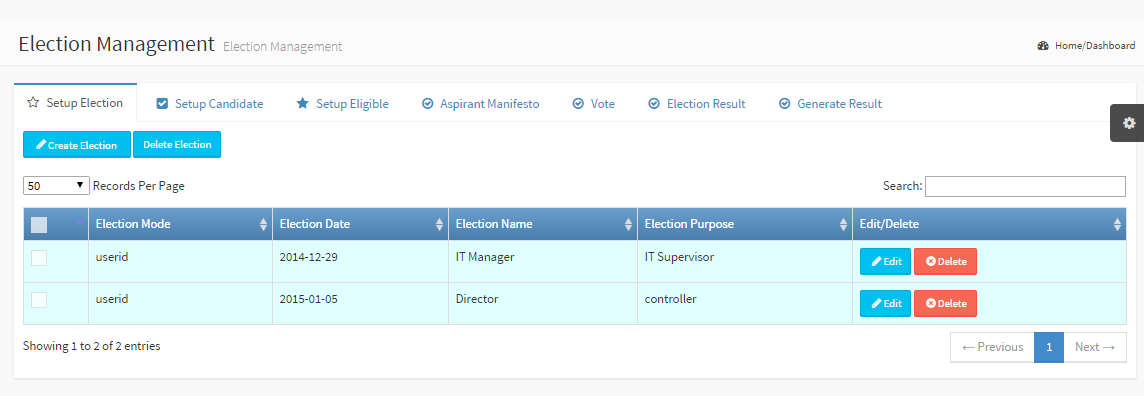
Setup an Election Election Mode: The means by which the election would be conducted Election Date: The day one can vote Election Name: A name for that election Election Purpose: A short reason/description for the election Edit/Delete: Modify or delete an existing election |
|
Check Multiple records and click the top Delete Election button to delete more than one elections. |
|
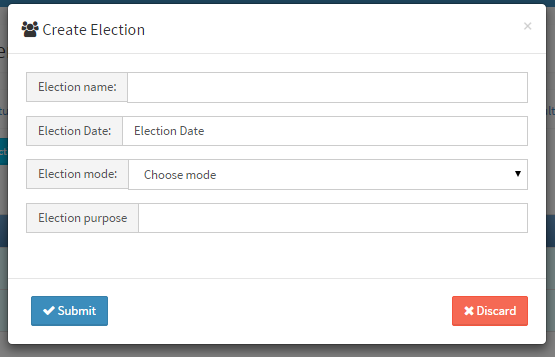
Create Election Fill the following fields to complete the form Election Name: Give the election a name Election Date: Select a day for the election from the datepicker Election Mode: Users can vote by userid, fingerprint, card or fingerprint and card Election Purpose: Give a short description/purpose. Click Submit button to complete the process |